5. Hold the work
- Under Workholding and tabs, tick Held at the start.
- Set Grip length to 8 (millimetres).
- Press Apply at the bottom of the section.
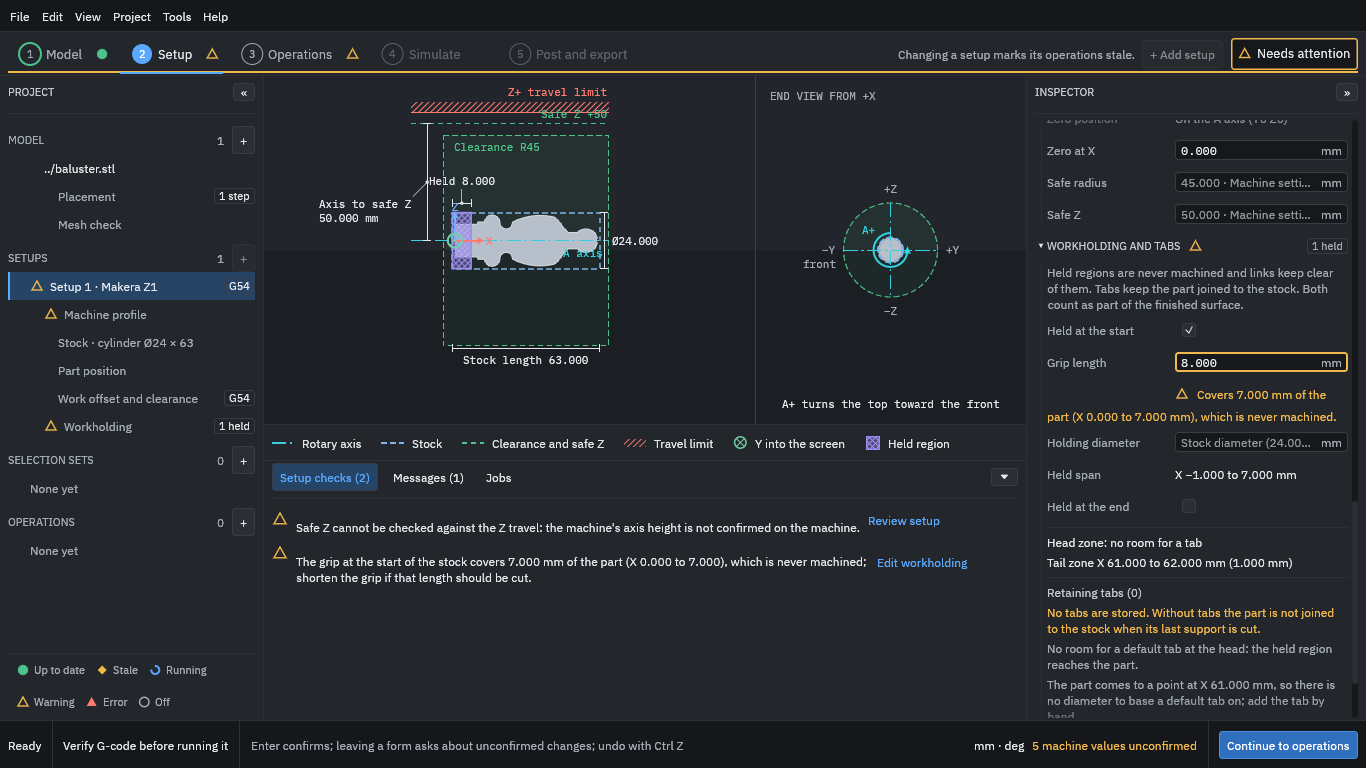
The first 8 mm of the stock, from X = -1 to X = 7, is now a held region: it is where the chuck grips. It is never cut and the paths keep clear of it. The program warns that this length covers 7 mm of the part (the plain end), which therefore stays as bar. That is what you want here; the warning would matter if you had held part of the shape you meant to cut.
The program also reminds you that, without tabs, the part is not joined to the stock when its last support is cut. This piece stays joined to the held bar, so this tutorial uses no tab; add tabs if your own job cuts the part free. A tab is a small bridge left uncut so that a part stays attached until you separate it yourself.
If you also support the far end of the stock, tick Held at the end the same way. The program treats the tailstock end as a held length only, so keep your own track of clearances there.
Press Continue to operations.